
Spotify for Creators
Spotify ABMusic & Audio
3.77.53K Reviews
- Version
- 7.114.2.1
- Installs
- 10.00M
- Age Rating
- Teen
Screenshots
Our Review of Spotify for Creators
 Analysis by Appyee
I approached Spotify for Creators as a working tool rather than another app for listening to music. Its purpose is to help people manage and grow a podcast, and that changes the way I judge it. I am looking for a clear workflow, quick access to useful information, dependable behavior during busy publishing periods, and a sensible experience on a phone. As a free Music & Audio app from Spotify AB, it is aimed at creators who want to keep an eye on their work without sitting in front of a desktop all day.
My overall impression is that it makes the most sense as a companion for an active podcast. It can fit naturally into the gaps of a normal day: checking how a recent episode is doing while commuting, reviewing the next task before recording, or keeping track of a show after publishing. It is less convincing if you are only curious about podcasting and do not yet have a show to manage. In that situation, the app’s value is harder to feel because its purpose is practical rather than entertainment-focused.
How it feels during everyday podcast work
The first thing I noticed is that the app’s usefulness depends more on the quality of its organization than on flashy presentation. A creator usually opens a management app with a specific question: Is the latest episode available? How is the show developing? What needs attention next? A good mobile companion should help answer that question quickly, without making the user reconstruct the entire publishing process from scattered screens.
That is where Spotify for Creators has a clear role. I would use it as a control point between recording sessions and larger editing work. It is not a replacement for every tool involved in producing a polished podcast, and I would not treat it as a full studio on a small screen. Instead, it is most useful when I need awareness and control while away from my main setup.
The app is free, which lowers the barrier for new creators who are testing an idea. That does not automatically make it the right choice for everyone. A free tool still costs time to learn, and podcast management can become complicated when a show has several contributors, a demanding release schedule, or a detailed production process. I would therefore judge it by whether it reduces small daily tasks rather than by whether it can replace a complete professional workflow.
Its store rating sits at 3.7 from around 85 thousand ratings, a result that suggests a mixed but substantial real-world response. I do not read that figure as a simple yes-or-no verdict. Creator tools often receive criticism when a particular workflow feels awkward, when an update changes familiar navigation, or when expectations exceed what a mobile companion is designed to do. For me, the useful question is whether the app’s strengths match the way I work.
Speed expectations when opening and checking a show
For a podcast management app, perceived speed is not only about how quickly the first screen appears. It is also about how much waiting happens between decisions. If I open the app to check a recent episode, I want the path from launch to useful information to feel direct. If I have to repeatedly reload screens or move through unnecessary steps, even a technically responsive app can feel slow.
I would expect Spotify for Creators to feel quickest during short, focused visits: checking the state of a show, reviewing recent activity, or making a small management decision. Those tasks suit a phone because they can be completed in a minute or two. The app becomes less comfortable when I try to use it as the center of a long production session. A phone screen is still a phone screen, and extended editing, planning, or comparison work is easier on a larger display.
One practical habit helps: I would open the app with a question already in mind. Instead of browsing every section after each episode, I would decide whether I am checking publishing status, monitoring audience response, or preparing the next action. This keeps the experience feeling faster because I am using the app as a focused dashboard rather than wandering through it.
Network conditions also matter to the perceived pace of any creator dashboard. A creator may be moving between home Wi-Fi, mobile data, and places with weak coverage. When a screen depends on current account or show information, delays can feel like app problems even when the connection is the real bottleneck. I would avoid making important publishing decisions in the last few seconds before a deadline and give the app enough time to confirm that a change has completed.
What happens during heavy-use moments
The stressful moments are not necessarily the ordinary ones. They are the minutes before a scheduled release, the period after correcting an episode detail, or the rush to check performance after sharing a new show with friends. In those situations, I care less about visual polish and more about whether the app helps me recover from uncertainty.
My advice is to separate creation from confirmation. I would prepare the episode and its details in the most comfortable tool available, then use Spotify for Creators to verify the important points and monitor what happens afterward. That division reduces the pressure on the phone and avoids treating a compact management app like a complete production workstation.
Another useful workflow is to check one change at a time. If I alter several details and immediately leave the screen, it becomes difficult to know which action succeeded if the interface takes a moment to update. Making a single adjustment, waiting for visible confirmation, and then checking the show again is slower in theory but safer in practice. It also makes recovery easier if the connection drops or the app needs to refresh.
Creators working with a backlog should also resist opening the app only when something is urgent. A short routine after each release can reveal problems while they are still easy to fix. I would check the latest episode, confirm that the presentation looks right, and note any audience information that might affect the next episode. This turns the app into a lightweight operating habit instead of an emergency tool.
For a small independent show, that approach is realistic. For a team with many episodes, multiple people, and a strict calendar, the phone app may feel like one part of a larger system. I would keep detailed planning, long descriptions, and complicated editorial decisions in a desktop-friendly environment, then use the mobile app for quick oversight. That trade-off is not a failure; it is simply the boundary between mobile convenience and production depth.
Reliability and recovering from interruptions
Reliability matters more to me here than novelty. A creator needs confidence that a management action has been accepted and that returning to the app will not create confusion. The most reassuring mobile workflow is one that makes the current state easy to understand, especially after switching to another app, losing signal, or locking the phone.
I would treat every important action as incomplete until the app shows a clear result. This is particularly important when working on mobile data or in a crowded place where connectivity may change. If the screen appears stuck, I would avoid tapping the same control repeatedly. Instead, I would wait, revisit the relevant area, and check whether the show already reflects the change. Repeated taps can turn a temporary delay into uncertainty about what was actually submitted.
Recovery is also about keeping a separate record of the decisions that matter. Before making a significant update, I would keep the final wording or release plan somewhere else temporarily. That is not because I assume the app will fail; it is a sensible habit for any mobile publishing workflow. If I am interrupted by a call, a low battery warning, or a connection problem, I can resume without rebuilding the work from memory.
The app’s long presence in the category is relevant to my expectations. It was released on September 28, 2016, and the current version is 7.114.2.1. I see that history as a reason to expect an established product rather than a brand-new experiment, while still remembering that established apps can change their layouts and behavior over time. When an update arrives, I would spend a quiet minute checking where my usual tasks now live before attempting a time-sensitive release.
With over 10 million installs, it is clearly used beyond a tiny group of early adopters. That scale makes it easier for a creator to view the app as a mainstream companion, but it does not guarantee that every individual workflow will feel perfect. Podcasting has many different styles, from a solo weekly show to a large collaborative production, and one mobile design cannot optimize equally for all of them.
Device constraints and the cost of doing serious work on a phone
The minimum operating system is iOS or Android 11, so anyone using an older device should check compatibility before planning around the app. That requirement is reasonable for a current creator tool, but it can still matter to people who keep an older phone as a dedicated recording or publishing device. A compatible operating system is only the starting point; available storage, battery condition, and network quality also affect how comfortable mobile management feels.
I would be especially careful with older or budget hardware during a busy production day. Even when an app itself is not demanding, switching between recording, editing, file management, and publishing can leave less memory available and make the whole phone feel sluggish. Closing unrelated apps before a focused management session can help. So can keeping the phone charged before starting a release workflow, since repeated refreshing and network use are not ideal when the battery is already low.
Screen size is another practical constraint. A compact phone is excellent for a quick status check, but less pleasant for comparing several episodes, reading long descriptions, or reviewing a large amount of audience information. On a tablet or larger phone, the same work may feel more manageable, although I would still keep the most detailed editorial work in a tool designed for it.
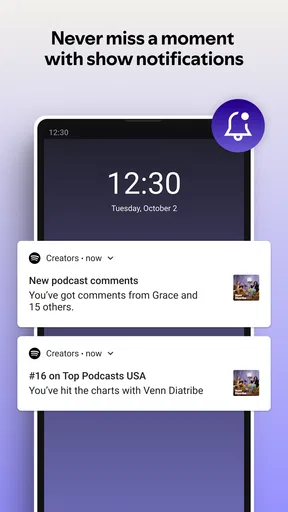
Creators should also think about notifications and interruptions. A phone is always connected to messages, calls, and other alerts, so it is easy to lose the thread of a publishing task. I would avoid making a rushed change while distracted. If an episode is important, I would set aside a short uninterrupted window, confirm the result, and only then move on to other apps.
The Teen content rating is worth noting for households and younger aspiring creators. It places the app in a category that is not intended to be treated like a child-focused tool. Parents or guardians deciding whether a younger user should manage a podcast should consider the wider online responsibilities involved, not just whether the app can be installed.
Who benefits most, and who should choose another approach
I think Spotify for Creators is a strong fit for a solo host who wants a simple mobile checkpoint between recording and publishing. It is also useful for a small team member who needs to stay informed while away from a desk. The free price makes experimentation easier, and the connection to Spotify’s creator ecosystem gives the app a clear purpose instead of making it a generic notes or file-management utility.
A realistic example would be a host who records on a weekend, prepares the episode on a computer, and then spends the following week traveling between work and home. That person could use the app during a lunch break to check the latest show activity, confirm that the episode is presented correctly, and decide whether the next release needs attention. The value is not that the phone replaces the studio. The value is that the host does not have to wait until evening to stay involved.
I would be more cautious for a creator who wants advanced audio production, extensive collaborative editing, or a highly visual planning system. In those cases, a dedicated podcast host, desktop editor, project-management service, or analytics platform may be a better primary choice. Spotify for Creators can still have a place in that setup, but I would not make it the only tool without testing the complete workflow first.
It is also not the best choice for someone who simply wants to discover and listen to podcasts. The app is built around managing and growing a podcast, not around replacing the regular Spotify listening experience. If your main goal is music, podcast playback, playlists, or casual discovery, the standard consumer app is the more natural destination. Choosing the creator app for that purpose would create unnecessary friction.
How it compares with familiar alternatives
Compared with a general podcast-hosting dashboard, Spotify for Creators feels more focused on the needs of people who want a direct mobile relationship with their show. A broader hosting service may offer a different balance of distribution controls, production tools, or reporting depth. I would choose the broader service when I need a central home for a complex operation, then consider this app as a convenient companion for checking the show from a phone.
Compared with a desktop browser dashboard, the app wins on immediacy. I can imagine opening it while away from my desk and making a quick decision without finding a laptop. The browser usually wins for long sessions, careful writing, side-by-side comparison, and work that benefits from a keyboard. I would not force one to replace the other; the best arrangement depends on whether the task is monitoring or building.
Compared with a notes app, Spotify for Creators has a more relevant context for podcast management. Notes are excellent for scripts, ideas, and backup copies, but they cannot substitute for a place where I can review the state of a show. I would use both: notes for thinking and preserving text, the creator app for checking the podcast itself.
Compared with a generic analytics tool, a creator-focused app should feel more actionable because the information is closer to the publishing workflow. Still, numbers alone do not tell me why an episode worked or failed. I would combine any performance information with listener feedback, release consistency, and my own editorial judgement rather than changing the whole show after one encouraging or disappointing result.
The most important trade-off is convenience versus depth. Spotify for Creators is appealing when I need a fast, specialized mobile view of my podcast. A different option is better when I need exhaustive controls, complex collaboration, or a complete production suite. Knowing that distinction before adopting it prevents disappointment.
Small habits that make the app more useful
I would begin by defining the few checks that genuinely matter to me. For example, I might use the app after every release, once during the week, and before preparing the next episode. A fixed rhythm prevents compulsive checking and gives the information enough time to become meaningful.
I would also keep episode preparation materials outside the app until they are ready. Draft titles, descriptions, guest details, and publishing notes are easier to revise in a comfortable writing environment. Once the wording is final, transferring it during a deliberate review reduces accidental edits and makes the phone session shorter.
For creators with limited time, the most useful insight is that monitoring can be more valuable than constant editing. A quick look at the show’s current state can tell me whether I need to act now or whether the next task can wait. That helps protect the creative part of podcasting from endless dashboard checking.
Finally, I would test the complete workflow before announcing a major episode. Install the app, sign in, locate the usual management areas, and perform a low-pressure check. This gives me a chance to understand how the app behaves on my particular device and connection. It is a simple precaution, but it is more useful than discovering the workflow during a deadline.
My performance verdict
After looking at it as a daily creator companion, I see Spotify for Creators as a practical free app with a clear audience. Its strongest quality is convenience: it brings podcast management closer to the moments when creators actually think about their shows. I would recommend it to independent hosts and small teams that want mobile oversight without pretending that a phone can replace every part of production.
My reservations are equally clear. The experience may feel limited if I expect a full studio, a detailed project-management system, or the depth of a large desktop dashboard. Mobile performance is also shaped by the device, connection, and interruptions around it, so I would build a little caution into important publishing tasks. The app is most dependable as part of a workflow, not as the sole place where every piece of podcast work happens.
With its Teen rating, free access, current version 7.114.2.1, and established presence from Spotify AB, it is easy to understand why many creators would try it. The average of 3.7 shows that it is not universally loved, so I would approach it with realistic expectations rather than assuming the brand alone guarantees a perfect experience.
My recommendation is simple: if you already manage a podcast and want a convenient way to stay connected to it from your phone, Spotify for Creators is worth trying. Use it for focused checks, confirmation, and day-to-day awareness. If your priority is advanced production or exhaustive control, keep a more powerful alternative in your workflow and let this app handle the mobile side of the job.
Verdict
Strengths of Spotify for Creators
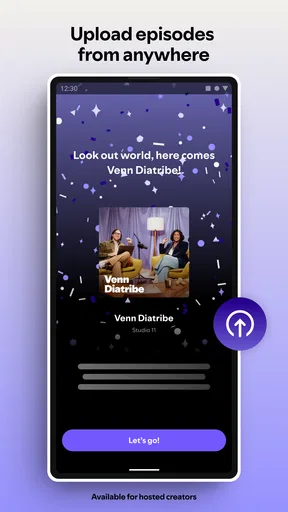
- Simple tools for uploading and managing podcast episodes
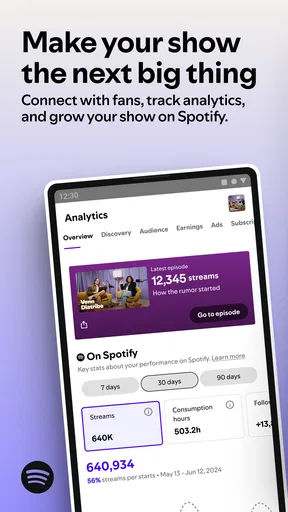
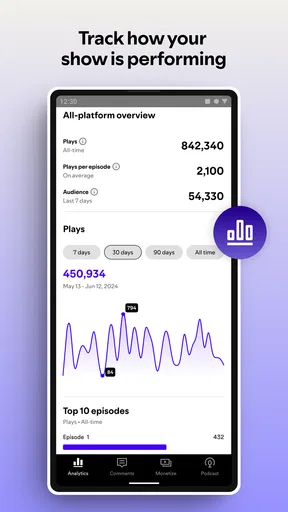
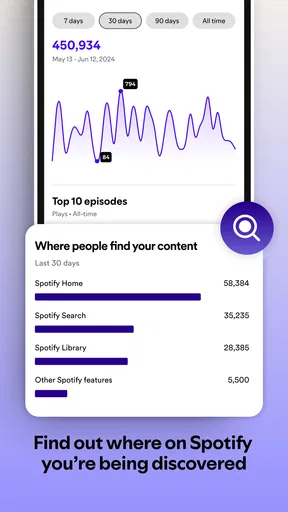
- Audience analytics help track plays, listeners, and engagement
- Supports video podcasts alongside audio content
- Easy episode scheduling and publishing workflow
- Direct access to Spotify’s large podcast audience
Limitations of Spotify for Creators
- Some advanced editing features require separate software
- Analytics may feel limited for highly detailed audience research
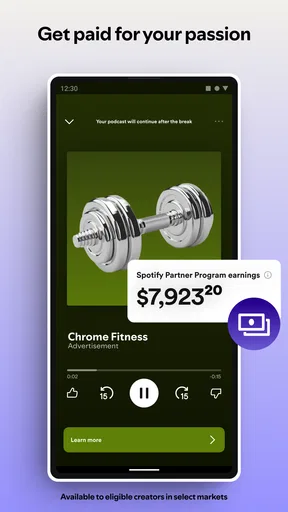
- Monetization options depend on eligibility and location
- Video uploads can require significant storage and bandwidth
- Support response times may vary for smaller creators
Other Releases by Spotify AB
View All
Spotify: Music and Podcasts
Music & Audio4.3

Spotify: Music & Podcasts
Music & Audio3.9
Similar Picks in This Category
View All
YouTube Music
Google LLC4.4

Samsung Music
Samsung Electronics Co., Ltd.3.8
Spotify: Music and Podcasts
Spotify AB4.3

JioSaavn - Music & Podcasts
Saavn Media Limited4.3

Lark Player:Music Player & MP3
Lark Player Studio - Music, MP3 & Video Player4.6

StarMaker: Sing Karaoke Songs
SKYWORK AI PTE. LTD.4.3
Frequently Asked Questions
What is Spotify for Creators, and who is it designed for?
Spotify for Creators is a platform for people who produce podcasts, video podcasts, and other spoken-word content. It allows creators to upload, manage, distribute, and monitor their shows from one place. It is mainly intended for independent podcasters, publishers, businesses, and established networks that want to reach Spotify listeners and review audience performance.
Is Spotify for Creators free to use?
Spotify for Creators generally allows users to create an account and publish podcast content without paying a standard hosting subscription fee. However, some monetization opportunities, distribution features, or eligibility-based programs may depend on your country, audience size, content type, and account status. Before relying on earnings, check the current terms and available features in your region.
Can I upload both audio and video podcasts with Spotify for Creators?
Yes, Spotify for Creators supports podcast publishing workflows that can include audio and, where available, video content. Video availability and certain presentation features may vary by market and show eligibility. Creators should also verify supported file formats, upload limits, content policies, and whether existing episodes can be imported or managed through the platform.
How does Spotify for Creators help me understand my audience?
The platform provides analytics designed to help creators evaluate how their shows perform. Depending on the account and available regional features, you may see plays or streams, audience trends, episode performance, listening behavior, and engagement information. These statistics can help identify popular topics and improve publishing decisions, although analytics should not be treated as perfectly identical to total downloads across every service.
Can I make money with Spotify for Creators?
Spotify for Creators may offer monetization options such as advertising, subscriptions, or other creator programs, but access is not guaranteed for every user. Eligibility can depend on location, audience activity, content compliance, and Spotify’s current requirements. Revenue also varies considerably, so creators should review payment terms, advertising controls, tax responsibilities, and program availability before treating the platform as a dependable income source.
